
Manage My Membership
Follow these steps to manage your membership with the Nonprofit Center of Milwaukee. Please review and update your accounts at least annually.
Log In. If you are not already logged in, click on the first link on Member Logins page and log in. To access an organizational account, use your organization's account login and password. If you don't know it, ask the primary contact for your membership. To access your individual account, use your individual login and password. Forgot your login or password? Click here. If you need assistance, please contact NPC at 414-344-3933.
Manage My Membership. Once you're logged in, look at the top right for "What do you want to do?" and click on arrow by pull-down menu and select "Manage My Membership."
Manage My Membership. Once you're logged in, look at the top right for "What do you want to do?" and click on arrow by pull-down menu and select "Manage My Membership."
For Organizational Accounts
For Organizational Accounts
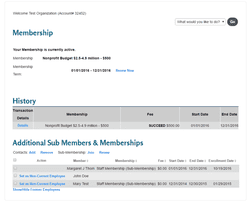
Under "Manage My Membership," below your membership level, term, and history, you can see individuals connected to your organization, such as employees and board directors, who have engaged with the Nonprofit Center. Go to "Additional Sub-members and Memberships."
First, if someone is no longer with your organization, click on the blue link "Set as Non-Current Employee."
Second, if someone has joined your organization, click on the blue link "Add" next to "Contacts" and follow the prompts.
Third, add or renew your free staff memberships.
Under "Manage My Membership," below your membership level, term, and history, you can see individuals connected to your organization, such as employees and board directors, who have engaged with the Nonprofit Center. Go to "Additional Sub-members and Memberships."
First, if someone is no longer with your organization, click on the blue link "Set as Non-Current Employee."
Second, if someone has joined your organization, click on the blue link "Add" next to "Contacts" and follow the prompts.
- Add their name, email address, and role within your organization at a minimum.
- Please create a new contact instead of changing the name on another person's account.
Third, add or renew your free staff memberships.
- Each current nonprofit member gets ten free staff memberships. Champion members get fifteen.
- Click on the blue link "Join" next to "Sub-Membership" and follow the prompts to give someone a free staff membership.
- Click "Renew" and follow the prompts if you are renewing it.
If you need assistance, please contact the Nonprofit Center at 414-344-3933.


